Free Seamless Floral Pattern Generator & Maker

Create, customize, and download repeat floral patterns, tileable backgrounds, and custom fabric designs instantly.

background color :
width & height : px
tile :
download tiled image : 2x2, 3x3, 4x4, 5x5

This free AI-powered seamless pattern generator helps you create high-resolution, tileable designs in seconds—no design skills required! Simply upload an image, adjust it with an easy drag-and-drop, and optionally add your company logo, face, icons, or custom graphics. Designed for anyone looking to create unique custom printed clothing, this mobile-friendly tool lets you generate crisp, professional pattern files on any device to share with friends or bring your fashion ideas to life.

Floral patterns are a popular choice for custom Hawaiian shirts. Simply place your personal photo or face onto a floral backdrop to create a one-of-a-kind Aloha shirt!

Enjoy a 100% free AI pattern generator with no sign-up, no limits, and no watermarks. Think of it as your personal creative assistant, built to simplify pattern making. If you've been wondering how to design a seamless pattern for your next Hawaiian shirt, this handy tool will get you started instantly!

How to use this seamless floral pattern generator

  1. We have prepared more than 30 kinds of floral patterns in advance, you can choose any pattern you like.
  2. You can also add your own patterns, after adding your pattern, remember to check it, we recommend using images in png format with a transparent background and a pixel size of approximately 500px.
  3. Click "redraw" button and the seamless pattern will be drawn automatically.
  4. Try "redrawing" a few more times and you may get a design result you like.
  5. If you want to adjust the position of any pattern, you can drag it directly.
  6. Drag the middle of the pattern to move the pattern, and drag the sides edges of the pattern to rotate it.
  7. If a pattern is obscured by others, double-click it to bring it to the front.
  8. Drag and move the icons on the control block can change the order of the drawing layers.
  9. Double-clicking an icon on the control block will create a mirror icon of itself
  10. Download the seamless pattern you designed.
  11. You can use our seamless pattern tiling tool to help you arrange it quickly, or download tiled image (2x2, 3x3, 4x4) directly.
  12. Open our online custom clothing catalog, choose the clothing style you want, open online designer, upload your design and see the mockup online, If you like it order it.

How to Use This Seamless Floral Pattern Generator (Step-by-Step)

  1. Choose built-in patterns: Browse over 30 pre-loaded floral designs and select the ones you like.
  2. Upload custom images: Add your own graphics and check the box to enable them. For best results, use transparent PNG files around 500x500 pixels.
  3. Generate automatically: Click the "Redraw" button, and your seamless pattern will be generated instantly.
  4. Explore variations: Click "Redraw" multiple times to randomize the layout until you find a design you love.
  5. Reposition patterns: Drag any element directly on the canvas to adjust its position.
  6. Move & rotate: Drag from the center of an image to move it, or drag near the edges to rotate it.
  7. Adjust overlap: If a pattern element is hidden behind another, double-click it on the canvas to bring it to the front.
  8. Reorder layers: Drag and drop the pattern icons in the control panel to change their drawing layer order.
  9. Mirror elements: Double-click any icon in the control panel to generate a mirrored version of that pattern.
  10. Download your design: Export your final seamless pattern tile in high resolution.
  11. Preview tiled backgrounds: Use our seamless pattern tiling tool to visualize the full repeat, or download pre-rendered tiled images (2x2, 3x3, 4x4) directly.
  12. Create custom apparel: Visit our custom clothing catalog, select your preferred garment, upload your pattern to the online designer, preview the mockup, and place your order!
how to use this seamless pattern generator

Application of seamless floral patterns on shirts

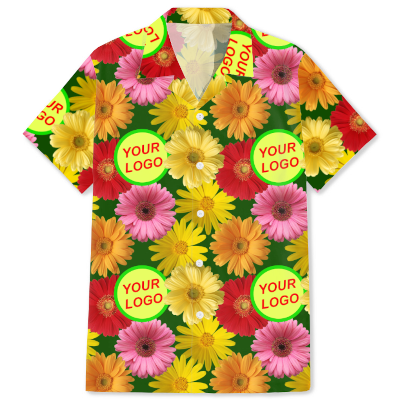
Floral seamless pattern with logo

free seamless floral flower pattern with your logo

Tiling 3x3 on Hawaiian shirt

floral Hawaiian shirt with your logo

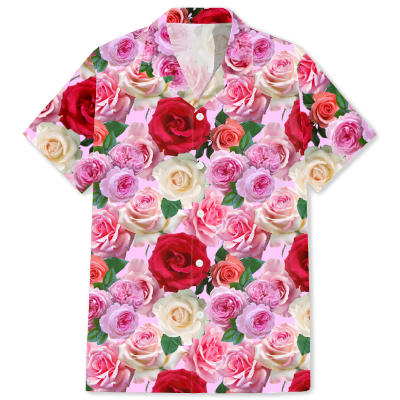
Floral seamless pattern

free seamless floral flower pattern image download design generator

Tiling 3x3 on Hawaiian shirt

floral Hawaiian shirt

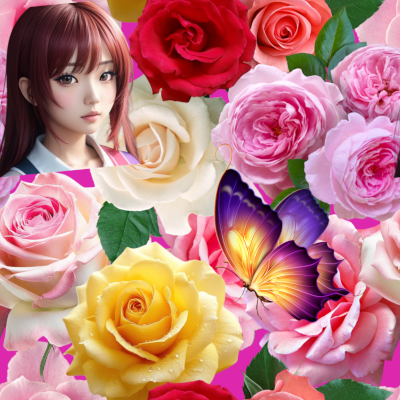
Floral seamless pattern with face

free seamless floral flower pattern with face

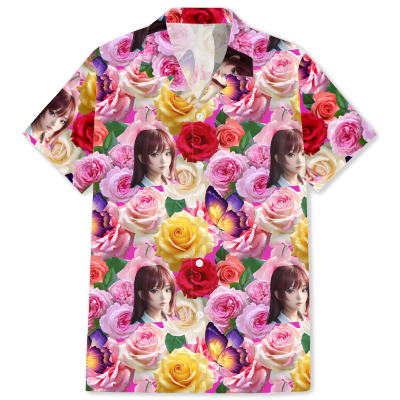
Tiling 3x3 on Hawaiian shirt

floral Hawaiian shirt with face

With this AI seamless pattern generator, you can effortlessly create endless high-quality, tileable designs in seconds. The showcase above demonstrates the diverse patterns you can generate—simply select your favorite elements, click "Redraw," and get an instant custom pattern. It’s a fast, powerful, and completely free design tool built to streamline your creative process.

Skip the hassle of searching the web for graphics or paying expensive design fees. We offer a rich collection of pre-loaded floral assets to get you started immediately. Want something truly unique? Upload your own photos, logos, or artwork to unlock endless custom design possibilities!

How to Create Seamless Patterns Using Your Own Images or Icons

  1. Find high-resolution PNGs: Look for free graphics online in PNG format. High-resolution images with transparent backgrounds work best.
  2. Check image size: We recommend images at least 500x500 pixels. Larger images are fine, as the tool allows you to easily scale them down.
  3. Ensure transparent backgrounds: Make sure your images have transparent backgrounds so they blend seamlessly. You can use free online background removers if needed.
  4. Upload your graphics: Select 5 to 7 of your favorite images, upload them to the panel, and check the boxes to include them in your design.
  5. Personalize your design: Feel free to add your company logo, personal photo, pets, or custom artwork to make a truly unique pattern.
  6. Generate & randomize: Click "Redraw" to let the AI automatically arrange your uploaded assets into a seamless repeat layout.
  7. Fine-tune placement: Drag and rotate individual elements directly on the canvas until you achieve the perfect composition.
  8. Enjoy 100% free access: No sign-up or account required! Enjoy unlimited pattern generation with zero hidden costs or restrictions.

Frequently Asked Questions (FAQ)

Q1: What is a seamless pattern?

A seamless pattern (also known as a repeatable or tileable pattern) is a design created so that its edges match up perfectly when duplicated and placed side-by-side. It can be repeated infinitely in any direction without showing visible seams, lines, or interruptions, creating a smooth and continuous background.

Q2: How do I tile or repeat a seamless pattern?

Tiling a seamless pattern is simple! You can use our free seamless pattern tiling tool to instantly combine your pattern tiles into a larger grid (such as 2x2, 3x3, or 4x4). Alternatively, you can import your downloaded pattern into design software like Photoshop or Illustrator and set it as a repeating pattern fill.

Q3: What can I use seamless patterns for?

Seamless patterns are extremely versatile and widely used across both print and digital media, including:

Q4: Why should I use AI to generate seamless patterns instead of drawing them manually?

Creating seamless patterns manually requires precise calculations and advanced design skills to ensure the edges align seamlessly. Our AI seamless pattern generator automates this process entirely—allowing you to generate professional, high-resolution tileable designs in seconds with zero design experience required!

Q5: Can I use custom photos or logos in my seamless pattern?

Yes! You can upload your own PNG files—such as company logos, personal photos, pet pictures, or custom icons—to create 100% personalized patterns for branding, events, or unique gift items.

Use this seamless pattern generator on your smartphone

Custom Clothing | AI Image Generator

This seamless floral pattern generator is 100% self-developed by us, copyright © www.ginifab.com, all rights reserved.