Transparent Online Protractor
This transparent online protractor allows you to easily measure angles of any object or image in real-time. Whether you are measuring directly on your screen or using a captured photo, simply upload your image and drag the virtual protractor's midpoint to the angle's vertex for a precise reading. Designed for maximum accuracy, our tool supports zooming, rotating, and repositioning. Even better, you can switch to camera mode to turn your device into a professional angle finder instantly.
How to use this online protractor?
This versatile tool allows you to measure angles on your screen with ease. Below are the ways you can interact with the protractor and the background.
1. Controlling the Protractor
- Move: click and drag the midpoint (center) to reposition it.
- Rotate: drag the edges near the 0° or 180° marks to rotate, just like a physical protractor.
- Resize: drag the edge near the 90° mark to change the radius (make it larger or smaller).
- Visual Guides: simply hover your mouse over different areas to see helpful operation prompts.
2. Measuring with Pushpins
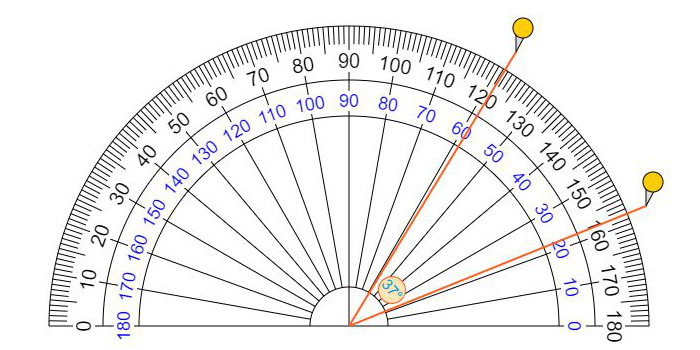
- Add Pins: click on the outer edge of the protractor to place a pushpin.
- Measure: place two pushpins to automatically display the degrees of the angle between them.
- Edit Pins: drag a pin to adjust its position, or double-click it to remove it.
3. Background & Image Tools
- Upload Images: drag and drop a file, press Ctrl+V to paste a screenshot, or use the Choose Picture button.
- Adjust Background: hold Ctrl and drag to move the background image, or use the zoom tools to align it perfectly.
- Camera Mode: turn on the camera to make the protractor transparent, allowing you to measure real-world objects via your webcam or smartphone.
4. Tips for Best Experience
- Mobile Users: since mobile browsers don't support drag-and-drop, please use the provided buttons in the control panel for all adjustments.
- Save & Share: once your measurement is complete, you can download your result or share the design with others for free.
🔒 Your Privacy Matters: This tool is a pure client-side application. Whether you upload a photo, paste an image, or use your camera, all data is processed locally within your browser. We do not upload, store, or see your files or camera feed on our servers, ensuring 100% privacy and security for your personal or professional work.
Measure Angles Using Camera or Images
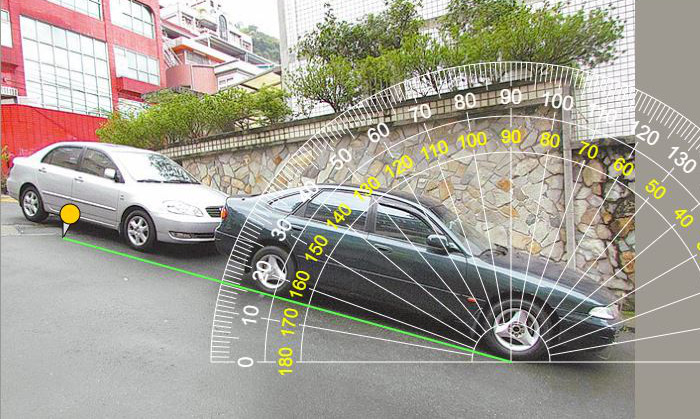
Easily measure the angle of real-world objects—such as cars, roads, buildings, or landscapes—by capturing a photo or uploading an existing file. Our transparent online protractor serves as a virtual overlay, displaying your image perfectly in the background. Simply drag the protractor or place pushpins to calculate precise degrees. Supported image formats include JPG, GIF, PNG, SVG, and WebP.
Customizable Controls for Better Visibility
To ensure maximum precision, you can fully customize the protractor's appearance in the Control Panel. If the background image makes the scale hard to read, simply change the protractor's color for better contrast. You can also move, rotate, or adjust the size (radius) of the protractor to align perfectly with your target object.
What is an Angle?
In geometry, an angle is a figure formed by two rays, called the sides, sharing a common endpoint known as the vertex. Essentially, an angle measures the amount of rotation or turn between these two lines. Angles are foundational to fields ranging from architecture and engineering to navigation and graphic design.
What is a Degree (°)?
A degree is the most common unit used to measure the size of an angle. The degree symbol is °. By mathematical convention, a full circle is divided into 360 equal parts, meaning a complete rotation is 360 degrees.
How to measure angles using a protractor?
To measure an angle, place the center hole of the protractor directly on the vertex (the corner point) and align the 0° baseline with one side of the angle. Look at where the second side crosses the curved edge and read the number on the scale that starts at zero. If the angle is narrow (acute), use the smaller numbers; if it is wide (obtuse), use the larger ones.
Our Facebook Pages
Visit this page on your smartphone
Help Us Improve This Page
We are committed to providing a better interface and user experience,
and we welcome any suggestions for improvement.
The text on this page was automatically generated by Google Translate and may contain inaccuracies.
If you can provide a more accurate description, please click the button below. ›››
Please be respectful and use this tool responsibly.