Our Online Ruler Features
This is a convenient and practical online ruler that can be calibrated to actual length, it supports both metric (millimeters/cm) and imperial (inches) units, the upper half is the millimeter ruler and centimeter ruler, the lower half is an inch ruler. To accurately measure the length of an item, we recommend that you calibrate it before use. 🙉
How to adjusting this virtual ruler to actual size
- Tell me your screen diagonal size (in inches), and I can calculate and set it for you directly.
(click here to input your screen size)
Your screen resolution: pixels, device pixel ratio (DPR): . Based on your PPI setting: , your screen size (diagonal) should be: "( cm), width: "( cm), height: "( cm). - The browser zoom level must be set to 100% for the virtual ruler to display correctly.
- The simplest way is to take out your bank card or credit card, compare it to the virtual ruler, and then adjust the PPI setting to make them the same length.
- Use standard objects to compare lengths, such as banknotes, credit cards, mobile phones, and copy paper. These objects have fixed lengths and can serve as good references for length comparison. The longer the object, the more accurate the measurement result. The ruler adjuster below can help us calibrate the accuracy more easily.
- The most accurate method is to use a physical ruler to measure directly and adjust the PPI setting, this will ensure that the scale of your screen ruler is completely accurate.
- Each device has its own PPI:
- Desktop monitor (AOC CQ27G2/96), DPR 1.5: 72.5 PPI
- Mobile phone (OPPO Reno 12): 116.7 PPI
- Apple iPhone X: 152.7 PPI
- Apple iPhone 11: 163 PPI
- Apple iPhone 12/13/14/15/16/17: 153.3 PPI
- Samsung Galaxy S22/S23: 141.8 PPI
- Samsung Galaxy S24: 138.5 PPI
- PPI here refers to the number of pixels used when drawing the ruler scales; it refers to CSS pixels, not device pixels, if you Google "iphone 17 ppi," it'll tell you 460 ppi, however the device pixel ratio(DPR) will affect the actual size, so you need to divide this number by it, for example, 460 ÷ 3 = 153.3. Using a PPI of 153.3 will give you a close approximation to the correct size. This is a bit complicated, so I recommend using a credit card to compare for accuracy, then you can use it with confidence.
How to use your computer screen as a ruler?
To use your screen as a ruler, all you need is a web browser and a credit card to compare lengths, or you can directly enter your screen dimensions and the ruler will be set automatically. No installation required, free to use, and works on your phone screen as well. Whether you need to measure length using a mobile screen or a desktop screen, this webpage can meet your needs.
Compare ruler with credit card
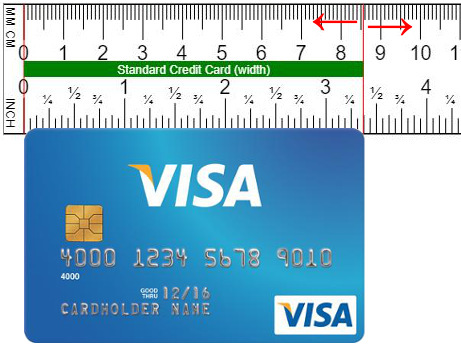
In calibration mode, click the (+/-) button, or simply drag the ruler left and right, take out your credit card for comparison, make the 3 3/8 inches mark match the width of your credit card, then save and refresh.
Browser zoom level
We recommend using a fixed zoom ratio of 100%, press Ctrl + 0 (Windows/Linux) or Cmd + 0 (Mac), different zoom ratios will affect the accuracy of the ruler, please compare the physical item and calibrate the setting by yourself. The zoom ratio of current page: %
Changing the system font size on the phone will affect the layout of the web page, just use the pinch gesture to bring your fingers together to reduce the page size, zoom out to the minimum and you can see the full size ruler.
Try this ruler on your smartphone
Share to your good friends
Our Facebook pages
Help us improve this webpage
Editor Records
- US IP 2603:6011:6000:2000:89ff:c880:4a20:1565, 2026/04/06 15:35:08
- TW IP 2001:b011:2015:d956:4488:17f8:c544:6c8d, 2026/03/13 07:59:41
- TW IP 2001:b011:2015:daf2:d90b:4c8e:16b:2b82, 2026/03/04 07:12:10
- TW IP 61.228.212.58, 2026/03/03 21:23:41
- IP 2001:b011:2015:d317:88d7:2303:2cae:a0d3, 2026/01/14 06:29:27
We record editor's information to reduce abuse.
Length Unit Converters
- Convert Centimeter or Millimeter to Inches : convert millimeter to inches, centimeter to inches, inches to centimeter or millimeter, include convert decimal inch to fractional inch (for example 1.45" = 1 7/16").
- Convert Meters to Feet : convert meters to feet and inches, or convert feet and inches to meters.
- Convert Yards to Meters : yards and meter converter, convert yards to meters, or meters to yards.
- Convert Centimeter to Millimeter : millimeter and centimeter converter, convert millimeter to centimeter, or centimeter to millimeter.