Our Online Ruler Features
This is a handy and convenient online ruler that could be calibrated to actual size, measurements in cm, mm and inch, the upper half is the millimeter ruler and centimeter ruler, the lower half is an inch ruler. In order to accurately measure the length of your item, we strongly recommend that you calibrate this online ruler first, set the correct pixels per inch to your own device, after adjustment, you will have the most precise ruler online. It can also interact with you; click on our ruler and it will talk, and you can talk to it too. 🙉
To avoid being affected by the "429 Too Many Requests", you can bookmark the page(online ruler) in another site.
How to adjusting this virtual ruler to actual size
- Tell me your screen diagonal size (in inches), and I can calculate and set it for you directly
Your screen resolution is pixels, based on a PPI setting, your screen size(diagonal) should be inches(68.6 cm), width: inches( cm), height: inches( cm). - The browser zoom level must be set to 100% for the virtual ruler to display correctly.
- The simplest way is to take out your bank card or credit card, compare it to the virtual ruler, and then adjust the PPI setting to make them the same length.
- Use standard objects to compare lengths, check your wallet, use any paper money to be our compare object, then search "the width of your paper money" online, when you know the width, you can adjust the ruler's PPI setting by it, you can compare to any standard size object at your side, e.g., coin, credit card, CD, banknote/paper money, mobile phone, in the office, letter paper or A4-sized printer paper is a good reference for length comparison, the longer the more accurate. Below ruler adjuster help us to calibrate accuracy more easily.
- The most accurate way, after i measure the size of virtual ruler by an actual ruler, i found the markings are not very accurate at 30cm, so i adjust the default pixels per inch(PPI) to 100.7, now i have the most accurate virtual ruler on the web.
-
Each device has its own PPI:
- my Desktop monitor (AOC CQ27G2/96), DPR 1.5: 72.5 PPI
- my Mobile phone (OPPO Reno 12): 116.7 PPI
- Apple iPhone X: 152.7 PPI
- Apple iPhone 11: 163 PPI
- Apple iPhone 12/13/14/15/16/17: 153.3 PPI
- Samsung Galaxy S22/S23: 141.8 PPI
- Samsung Galaxy S24: 138.5 PPI
- PPI here refers to the number of pixels used when drawing the ruler scales;
it refers to CSS pixels, not device pixels,
if you Google "iphone 17 ppi," it'll tell you 460 ppi,
however the device pixel ratio(DPR) will affect the actual size,
so you need to divide this number by it, for example, 460 ÷ 3 = 153.3.
Using a PPI of 153.3 will give you a close approximation to the correct size.
This is a bit complicated, so I recommend using a credit card to compare for accuracy,
then you can use it with confidence.
Your device pixel ratio(DPR) :
How to use your computer screen as a ruler?
If you want to use the screen as a ruler to measure length, all you need is a web browser and a credit card to compare lengths, or you can directly enter your screen dimensions and the ruler will be set automatically. No installation required, free to use, and works on your phone screen as well. Whether you need to measure length using a mobile screen or a desktop screen, this webpage can meet your needs.
Compare ruler with credit card
The simplest way to calibrate the scale is to prepare a credit card, select the option to use the credit card for comparison, enter the calibration mode, and begin adjustment. The width of a standard credit card is 85.60 mm (3 3/8 inches). Take out your credit card, click the button to start comparing lengths and calibrating.
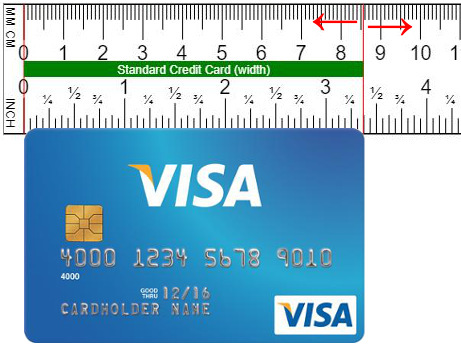
In calibration mode, click the (+/-) button, or simply drag the ruler left and right, take out your credit card for comparison, make the 3 3/8 inches mark match the width of your credit card, then save and refresh.
Translate into your native language
This online ruler is free to use,
and we want to provide a better native language environment,
make it more natural and easier for everyone to use,
if you are willing to offer a better description in your native language,
benefit your fellow countrymen,
please visit this translation page(click).
Below are some other language version.
The story of our ruler
One day, i took my laptop computer to work in the coffee shop, just had a project on hand, and i had to tell the customer the actual size of a product. Just like usual, i didn't carry a ruler with me, so i connected to the internet and tried to find an online virtual ruler to measure my product.
Unfortunately, after i tried the virtual online rulers on the Internet, i found a problem that these existing online rules are not very accurate. If i just want to know what the approximate length is, that's fine, but what i need is a more precise length so that i can apply it to my daily work.
So later, we developed an online ruler by ourselves. It not only improves the accuracy of the measurement, but also has a scale of inches and centimeters so that it can be used in our work.
If you are like us, you need a precise online ruler to measure the product size, i believe this online virtual ruler can also meet your needs.
Red vertical line on the ruler
Clicking on the ruler will mark a red vertical line, making it easy to compare metric and imperial lengths. If you want multiple red lines, press Ctrl and click.
How to read a ruler
This ruler offers a unique, auditory way to learn measurements.
- Hover your cursor over the ruler to display the visual length measurement.
- Click on any point to hear the corresponding length spoken aloud.
Try clicking different places to verbally confirm the length until you master reading the ruler!
Command function
I'm delighted that many people enjoy our online ruler and look forward to seeing all the visitors' comments.
Regarding the joke about comments or commands mentioned earlier,
I've decided to add a new "command" feature for our friends (at the top of the page).
I've tried my best to make AI interaction more intelligent. Here are some command examples.
Feel free to try them out and share them, and please let me know your thoughts.
- show 12 mm
- show 2.3 cm
- show me 5 2/3 in
- show me 6.4 inches
- show me how long 1 inch is
- show 1 ft
- compare 4 in and 10 cm
- compare 12.5 cm and 1 3/4 in
- draw a 5 inch circle
- draw a circle with a radius of 4 inches
- draw a 6.5 cm square
Voice function
- This is an interactive feature, you need to authorize voice recognition permissions.
- Tell it the length, and it will show you, for example, 10 cm, 5 in.
- saying "credit card" will display the credit card width.
- saying "stop listen" will turn it off
- If the voice freezed, click the button to stop, and click it again to start.
- I think it's a little deaf, it often doesn't understand what I'm saying, but i just think it's funny.
Browser zoom level
The zoom ratio of current page is 100%, we recommend using a fixed zoom ratio of 100%, press Ctrl + 0 (Windows/Linux) or Cmd + 0 (Mac), different zoom ratios will affect the accuracy of the ruler, please compare the physical item and calibrate the setting by yourself.
Changing the system font size on the phone will affect the layout of the web page, just use the pinch gesture to bring your fingers together to reduce the page size, zoom out to the minimum and you can see the full size ruler.
Use this screen ruler on your smartphone
Scan above QR code to open browser, and turn your mobile phone screen to landscape mode, so that the length of online ruler will longer.
If the dynamic ruler doesn't redraw after you rotate the smartphone, please ↻refresh your browser
More ruler-related tools
- Vertical virtual ruler : measure items in a vertical direction, suitable for mobile phones
- Virtual ruler on your image : practice how to use a ruler.
- Metric scale ruler : variable scale ruler with metric units(cm, m, km)
- Imperial scale ruler : variable scale ruler with imperial units(in, ft, yd, mi)
- Online protractor : use this transparent protractor to measure the angle of anything
- What is my screen size : use credit card comparison to calculate real screen size
When you need to measure the length of something, is it always impossible to find a ruler, our digital online ruler can help you, support both metric and imperial units, it can be calibrated quickly and the measurement is very accurate.
Our Facebook Pages
Share to your good friends
Length Unit Converters
-
Convert MM/CM to Inches :
convert mm to inches, cm to inches, inches to cm/mm,
include convert decimal inch to fractional inch (e.g. 1.45" = 1 7/16").
Where is 1.8" in on a 12" ruler ? Where is the 3.2 cm in the 12 inches ruler ? Try this cm inch converter. - Converter Meters to Feet : convert meters, feet and inches (m, ft and in), convert each other.
- Convert Yards to Meters : yards & meter converter, convert yards to meters, or meters to yards.
- Convert CM to MM : convert millimetre/millimeter(mm) to centimetre/centimeter(cm), or reverse convert.
How to use a ruler
This ruler measure in two different units of length, inches on one side (English ruler) and centimeters on the other side (metric ruler). A metric ruler is use to measure centimeter(cm) and millimeter(mm), the centimeter is a unit of length in the International System of Units; An English ruler provides incremental measurements in inches, with each inch further divided into smaller fractions.
Read an English ruler using fractions of an inch. The distance between any two large numbered lines is 1 inch. The large unnumbered line that is halfway between them is 1/2 inch. The smaller (but still prominent) line between the 1/2 mark and the numbered inch line is 1/4 inch. The tiny little lines between all of the more prominent lines are 1/16 inch.
Observe the much simpler metric rulers. The distance between any two large numbered lines is 1 cm, a metric ruler features two types of lines. The largest mark centimeters, or cm. The smallest lines mark millimeters, or mm. The prominent line between any two numbered lines is 1/2 cm. The small lines between the 1/2 mark and the numbered centimeter mark are 1/10 cm, otherwise known as a millimeter, keep in mind that there are 10 mm to 1 cm. The measurements are decimalized and there are no fractions.
Record distances by the name of the line that it most closely matches. If the length of an object goes to one mark past the halfway mark on your ruler then it will be 9/16 inch on an English ruler or 6/10 cm (or 6 mm) on a metric ruler.